How to Generate an Invoice: A Simple Step by Step Guide
Generating an invoice takes about five minutes once you know what goes on it. Here are the seven steps, a worked example and the mistakes that slow down payment.
Generating an invoice takes about five minutes once you know what goes on it. You need your business details, your client's details, a unique invoice number, the date, a clear list of what you are charging for and the total due. Add your payment terms and how to pay, then send it as a PDF.
This guide walks through each step, shows a worked example and covers the mistakes that slow down payment. If you would rather skip ahead, you can generate a free invoice here and follow along.
What you need before you start
Gather these details first so you can fill in the invoice in one go:
- Your business name, address, email and phone number
- Your logo, if you have one
- Your client's name, company and billing address
- What you delivered, with quantities, hours or rates
- The date you finished the work or delivered the goods
- Your tax number, if you are registered for VAT, GST or sales tax
- How you want to be paid: bank transfer, card, PayPal, Wise or another method
How to generate an invoice in 7 steps
1. Add your business details
Put your business name, address and contact details at the top. If you trade as a limited company, use the full registered company name. Add your logo so the invoice looks professional and is easy for the client to recognise in a pile of paperwork.
2. Add your client's details
Write the name of the person or company paying the invoice and their billing address. If the client has a purchase order number, include it too. Many larger companies will not process an invoice without one.
3. Give the invoice a unique number
Every invoice needs its own number so you and your client can track it. Keep the numbers sequential, for example INV-2026-001, INV-2026-002 and so on. Never reuse a number, even if you cancel an invoice.
4. Set the invoice date and due date
The invoice date is the day you issue it. The due date tells the client exactly when payment is expected. A clear date such as 30 November 2026 works better than vague wording, so add both the terms and the actual date.
5. List each item or service
Add one line for each product or service. Each line should have a short description, a quantity, a rate and the line total. Specific descriptions such as "Website homepage design, 2 revisions" get approved faster than "Design work".
6. Add tax, discounts and the total
Add the subtotal, then any discount, tax and shipping. Show the tax rate and amount separately so the client can reclaim it if they are able to. Finish with the total and, if the client has already paid a deposit, the balance due.
7. Add payment terms and send it as a PDF
Write your payment terms, for example "Due within 14 days", and the details the client needs to pay you, such as your bank account or PayPal email. Save the invoice as a PDF so the layout stays the same on any device, then email it to the client.
Example invoice
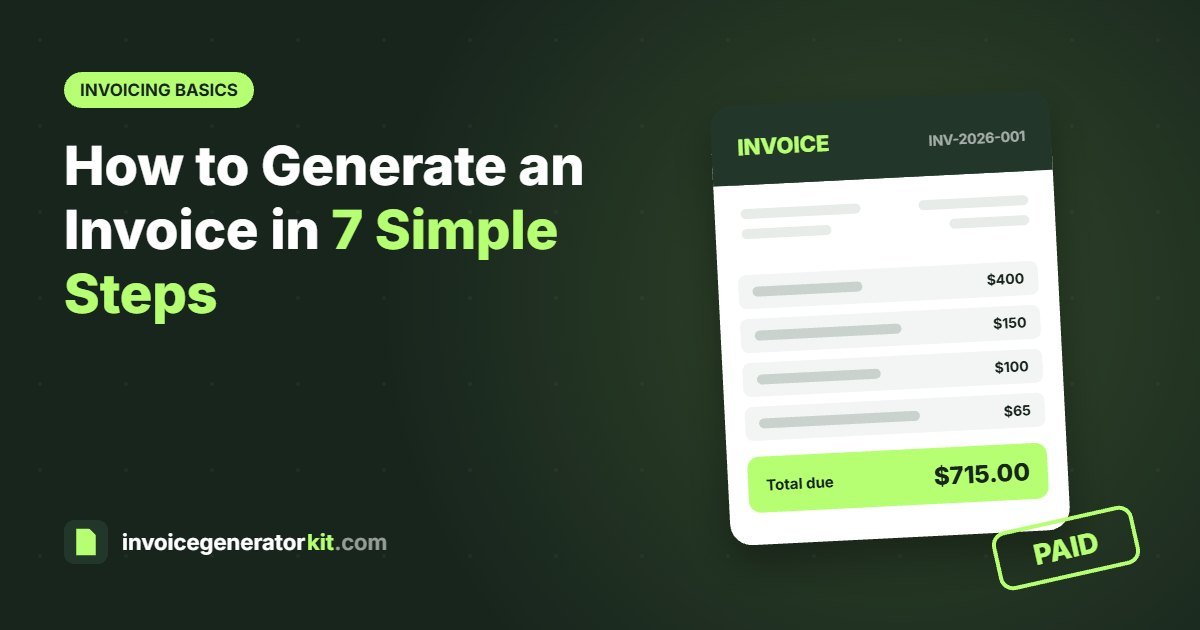
Here is what the line items and totals look like for a small freelance job billed in US dollars with 10% sales tax:
| Description | Qty | Rate | Amount |
|---|---|---|---|
| Logo design, 3 concepts | 1 | $400.00 | $400.00 |
| Business card design | 1 | $150.00 | $150.00 |
| Extra revision hours | 2 | $50.00 | $100.00 |
| Subtotal | $650.00 | ||
| Tax (10%) | $65.00 | ||
| Total due | $715.00 |
Above the table sit the invoice number, dates and both sets of contact details. Below it sit the payment terms and payment details.
Generate an invoice online for free
You can build an invoice in Word, Excel or Google Docs, but you have to do the maths and the layout yourself. An online invoice generator does both for you. With the free InvoiceGeneratorKit invoice generator:
- Enter your business details and logo once. They are remembered on your device.
- Add your client, or pick one you have invoiced before.
- Add line items. Subtotal, discount, tax and balance due are calculated as you type.
- Click Preview invoice to check it on a real A4 page.
- Click Download PDF and send it to your client.
There is no sign up and no watermark, and your invoices are saved in your own browser so you can track which ones are paid.
Common invoicing mistakes to avoid
- No due date. Without one, clients treat your invoice as low priority.
- Vague descriptions. Unclear lines lead to questions, and questions delay payment.
- Missing payment details. If the client has to ask how to pay you, you have lost days.
- Duplicate invoice numbers. They confuse your records and your client's accounts team.
- Sending an editable file. A Word file can be changed by accident. A PDF cannot.
- Invoicing late. Send the invoice as soon as the work is done, while it is fresh for the client.
What to do after you send the invoice
Keep a record of every invoice you send and when it is due. If payment has not arrived by the due date, send a short, polite reminder with the invoice attached again. When the money arrives, mark the invoice as paid. In InvoiceGeneratorKit this adds a PAID stamp, so you can send the same document back as a receipt.
For a full list of the details every invoice should carry, read our guide on what to include on an invoice.
Frequently asked questions
How do I generate an invoice for free?
Use a free online invoice generator such as InvoiceGeneratorKit. Enter your details, your client's details and your line items, then download the invoice as a PDF. There is no sign up and no watermark.
Can I generate an invoice without a company?
Yes. Freelancers and sole traders can invoice under their own name. Use your full name, any trading name you use, and your contact address.
What format should an invoice be sent in?
PDF is the safest format. It looks the same on every device and cannot be edited by accident, unlike a Word or Excel file.
How long does it take to generate an invoice?
With an online invoice generator it takes one to five minutes. Your business details are saved after the first invoice, so later invoices are even quicker.
Create your invoice now
Add your logo, line items and tax, see it on a real A4 page, then download a clean PDF. Free, with no sign up.